A restaurant management system, from the table to the kitchen.
A diner scans the QR code on their table and the menu for that table opens. They order, and the kitchen sees it arrive on a live queue and works it through to done while the diner watches the same order move. No app to install, no account, no login anywhere in the diner's path. Behind them, the owner runs the menu, the tables and their QR codes, the order history, the staff and the notifications. Angular and Firebase, deployed and running.
What it does
Six things, in the order they happen in: a diner arrives at a table, orders, the kitchen cooks it, and the diner follows it. Every line below is a screen or a behaviour the application has - read off its routes and its templates rather than off a category's marketing - and nothing is listed here that a person cannot reach.
- Scan the table, and the menu opens
- Each table has its own QR code, and it opens that table's menu directly. The table number is already known, so nothing has to be typed and nobody has to be flagged down.
- Order without an account
- Browse by category, filter to vegetarian, add items and adjust quantities. There is no app to install, no account to create and no login anywhere in the diner's path.
- A checkout that asks for a phone number and little else
- The cart shows every line, its quantity and the running total. A phone number is required and a name is optional - and a phone number that has ordered before fills its own name in.
- The kitchen sees the order as it is placed
- Orders arrive on a live queue as cards, filtered to pending, preparing or all of them, and are moved through those states as the kitchen works.
- The diner watches the same order move
- Placing an order returns a link that tracks it from pending to preparing to completed, updating on its own rather than on a refresh.
- And can find it again from anywhere
- An order number and the phone number that placed it are enough to open an order again, on another phone, with nothing to sign in to.
Three real screens
These are photographs of the running application, not drawings of it. They are the diner's three screens, captured at a phone's width on a demo restaurant seeded for the purpose, so nothing on them belongs to anybody.
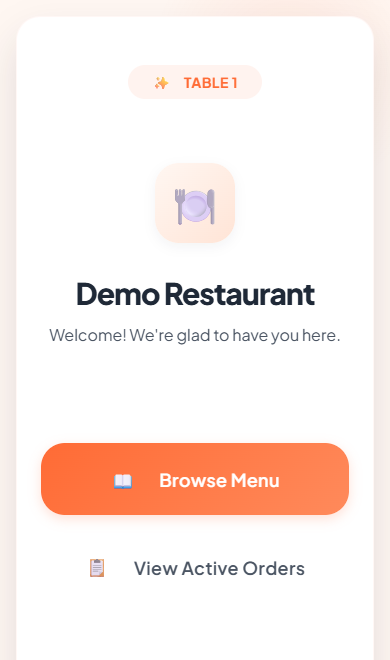
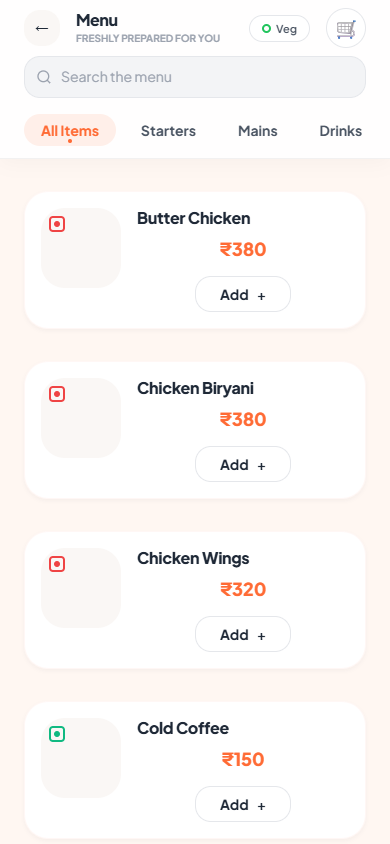
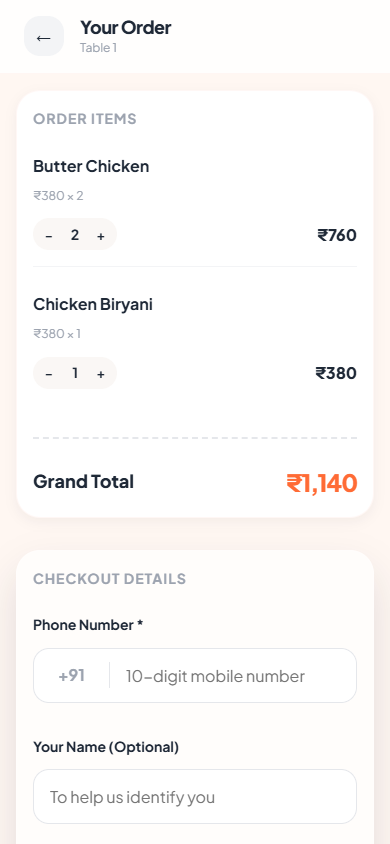
The kitchen queue and the seven owner screens are not shown. Every one of them is behind Google sign-in, so photographing them would mean signing in as somebody - and a staged screenshot of a screen nobody was really looking at is worth less than the description of it below.
What the owner gets
The other half of the system, and the half a diner never sees. These are the screens behind the sign-in, described rather than shown for the reason above.
- Menu management
- Add, edit and remove items; set price, description, category and calories; mark an item vegetarian, popular, out of stock or inactive without deleting it.
- Tables and their QR codes
- The dining tables are kept on the restaurant's own record, and the QR code for a table is generated in the app and downloaded to be printed.
- Order history, searchable
- Every order the restaurant has taken, searchable and filterable, each one openable in full.
- Editing an order after it is placed
- The wrong item, a change at the table, a cancellation - an order stays editable rather than being something only the kitchen can fix.
- Staff and access
- A manager is invited by their Gmail address, signs in with Google, and gets the kitchen queue and nothing else. The owner adds and removes them from inside the app.
- Push to the kitchen, and a way to test it
- A new order raises a browser push notification on the kitchen's device, and the notifications screen sends a test alert so the device can be proved registered.
Who can do what
Three tiers exist in the code, and the fourth is on this table because the system's own written specification describes it and the application does not have it. A route guard decides each of these rather than the interface merely hiding a link: a manager who asks for an owner's screen is sent back to the kitchen queue.
| Role | How they get in | What they reach |
|---|---|---|
| Diner | No sign-in at all | The menu, the cart, their own order's status, and looking an order up again. Reached from the table's QR code and nothing else. |
| Manager | Signs in with Google | The kitchen queue, and only that. The route guard sends a manager who asks for an owner screen back to the queue. |
| Owner | Signs in with Google | Every screen for their own restaurant: the menu, the tables and their QR codes, the order history, order editing, staff, notifications and the restaurant's own profile. |
| Super admin | Not built | The specification describes a tier that manages restaurants across the whole install. It is not in the code - there is no such role, no guard for it and no screen. |
The first row is the distinctive one. Every other restaurant system puts the diner behind something - an app, an account, a table code typed into a form - and the whole design here runs the other way: the QR code carries which restaurant and which table, and there is nothing else for the diner to prove.
How it is built
Angular in the browser, Firebase behind it, and nothing else in the way. The choice worth pointing at is the live listener: the kitchen queue and the diner's order status are the same data read two ways, so neither of them polls and neither needs refreshing.
- Angular 21
- Standalone components, lazily loaded a screen at a time, with route guards deciding who reaches what.
- Firebase Firestore
- The database, read through live listeners - which is why the kitchen queue and the diner's order status both move without a refresh.
- Firebase Auth
- Google sign-in, and only for staff. It is never in a diner's way.
- Firebase Cloud Messaging
- Browser push, so a kitchen that is not looking at the screen still learns about an order.
- Firebase Hosting
- Where it is deployed, with the single-page rewrite that lets a table's QR URL resolve.
What it is not
An honest list, because everything above would otherwise read as a finished commercial product. This is a working system with a real screen list, and these are the edges of it.
- There is no payment step
- An order is placed and a bill is produced, and money is settled the way the restaurant already settles it. Nothing here takes a card.
- The analytics dashboard is switched off
- The screen is built, and its route is disabled in the router until the numbers behind it are real. It is not reachable, so it is not claimed here.
- One restaurant at a time
- The data is laid out per restaurant and the app works within one. The cross-restaurant administration tier described in the specification is not built.
- Menu photography is optional and mostly absent
- Items carry an image if one is uploaded, and the running deployment mostly has none - which is what the screenshots on this page show, because they were not staged.